Dynamic number insertion, explained: how each web call finds its source
Dynamic number insertion (DNI) is a call tracking method that swaps the phone number on your website for a tracking number tied to each visitor. When the visitor calls, the call is matched back to the source that sent them.
A tracking number is a phone number used to measure where calls come from. DNI is also called dynamic number swapping or dynamic phone number insertion. It's the same idea under three names.
Why dynamic number insertion exists
A web page shows one phone number. Without DNI, every visitor sees that number, whether they came from an ad, a search result or an email.
So when the phone rings, you can't tell which campaign earned the call. Your form fills and clicks are tracked; the calls are a blind spot.
DNI closes that gap. One page serves every source, and each visitor sees a number that carries their source with it.
How dynamic number insertion works, step by step
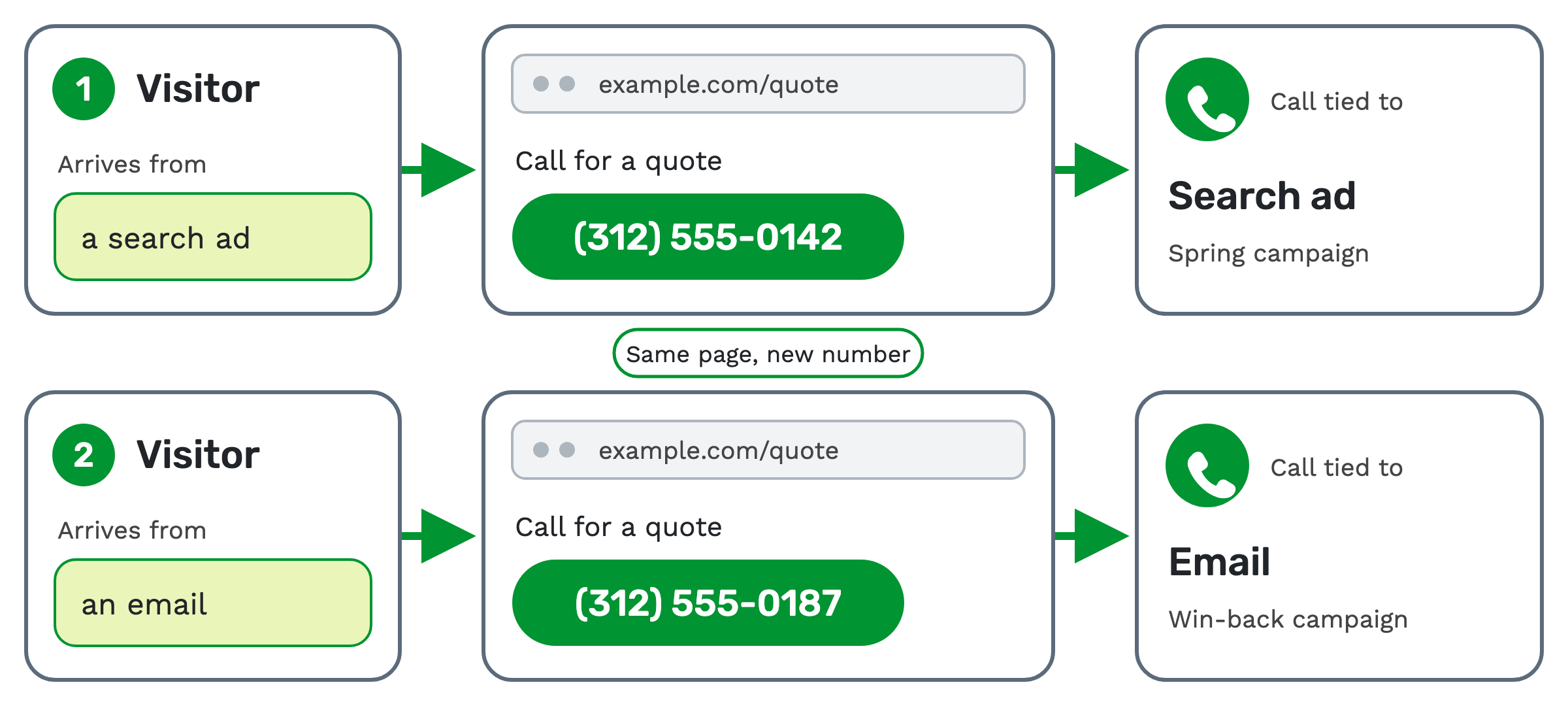
1. The visitor lands. A visitor arrives from a specific source. The link they clicked often carries UTM
parameters, tags such as utm_source and utm_campaign that name where the click came from.
2. The number is swapped. A JavaScript snippet on the page fetches a tracking number for this visitor. It replaces the number on the page, and on mobile it updates the tap-to-call link too.
3. The visitor calls. They dial the number they were shown. The same visitor keeps the same number as they move between pages.
4. The call is attributed. The dialed number maps back to the visitor's session. The call record is stamped with the traffic source, the UTM parameters, the referring URL and any custom tokens.
The swap happens on page load. The visitor just sees a phone number.
What a number pool is
A number pool is the set of tracking numbers DNI draws from. Each visitor session gets a different number from the pool.
A number stays with its visitor for a set hold time. Once that expires, the number goes back to the pool for the next visitor. It isn't reassigned while a session is still live, as long as the pool has enough numbers.
How big the pool needs to be
The pool needs enough numbers that every visitor on the site at the same moment gets their own.
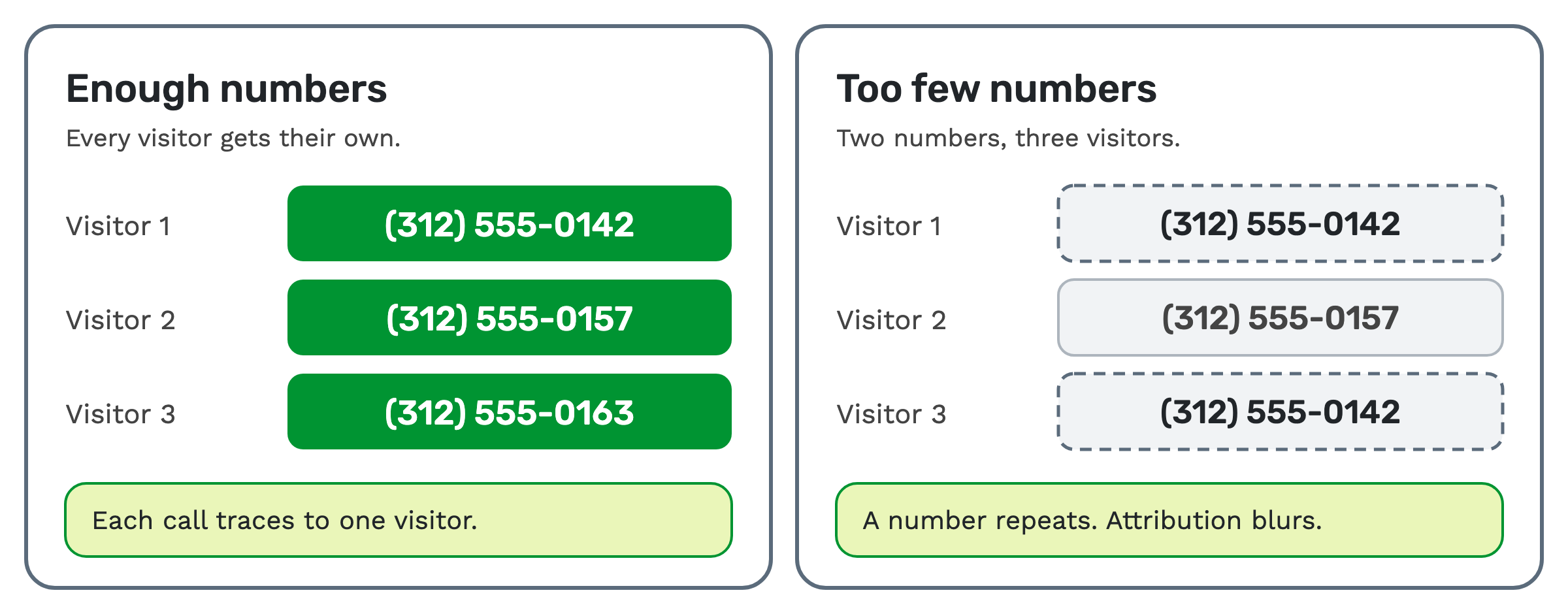 If you have more visitors at once than numbers, numbers get reused, and attribution gets less accurate. Size the pool
for your busiest moments, not your average ones.
When you don't need DNI
DNI is for web traffic, where one page serves many sources. If a source never sends visitors to your site, it doesn't need a pool.
A publisher's call campaign, a radio spot or a printed flyer can each carry one fixed tracking number. That's inbound call tracking at its simplest: one number per source.
Who uses dynamic number insertion
- Marketers and agencies use it to see which ads, keywords and campaigns drive calls, not just clicks.
- Publishers use it to prove that their web traffic produced the calls they're paid on.
- Networks use it to give paid search, SEO and affiliate traffic the same call attribution.
How dynamic number insertion works in TrackDrive
TrackDrive calls the feature Number Pools (feature page). Older pages call it a Ring Pool. Both names mean the same dynamic number insertion feature.
Create the pool. Go to Phone Numbers, then Number Pools, and add a pool. You pick the offer that routes its calls, an optional traffic source, and the provider, area code and local or toll-free numbers. You set:
- Number Limit. The most numbers the pool can hold.
- Token Hold Time. How many seconds a number keeps a visitor's data before it can be reassigned.
- Number Stockpile. How many numbers to buy when the pool is created.
- Auto Rent Numbers. Buys more numbers automatically, up to the limit.
The number pool guide walks through each field. From there, the offer decides where each call routes.
Add the snippet. Put the trackdrive-optimizer.js script tag in the head of each page. Then mark where the number
should appear. The script fills it with the visitor's number, including tel: links. The
setup article walks through the steps.
Check it works. Load the page and confirm a tracking number appears. Place a test call, then check that the call record carries the tokens you expect.
What you see on each call
Every call from a pool arrives with its visitor's data attached. That can include utm_source, utm_campaign,
utm_medium, utm_content, utm_term and the Google Ads click ID (gclid), plus any custom tokens you add to the pool.
Summary reports then group calls by traffic source, offer and other dimensions. You see which campaign sent each call.
What it costs on TrackDrive
Pool numbers are tracking numbers, billed at a monthly rate per number. Calls to them have a per-minute tracking rate, one for local numbers and one for toll-free, rounded up to the full minute. That rate includes forwarding the call to your buyer over toll-free or SIP; international and premium rate centers can add cost.
Commit plans lower the per-number rate, and there's no onboarding fee. See TrackDrive pricing.
Questions people ask
Is dynamic number swapping the same as dynamic number insertion? Yes. Swapping and insertion are names for the same thing: a different tracking number per visitor. Number Pools is what TrackDrive calls it.
Will a visitor see a new number on every page? No. The script remembers the visitor in their browser, so they keep one number across page views.
Is there an API for dynamic number insertion? Yes. The TrackDrive REST API has a number pools resource to list, create, update and delete pools.
What does the install involve? One script tag in the page head, your pool's token, and a placeholder where the number goes. An older PHP SDK still exists for existing integrations, but the script is the recommended path.
See it in action
Request a demo for a live walkthrough tailored to your use case, or start free, with no credit card and no onboarding fee.